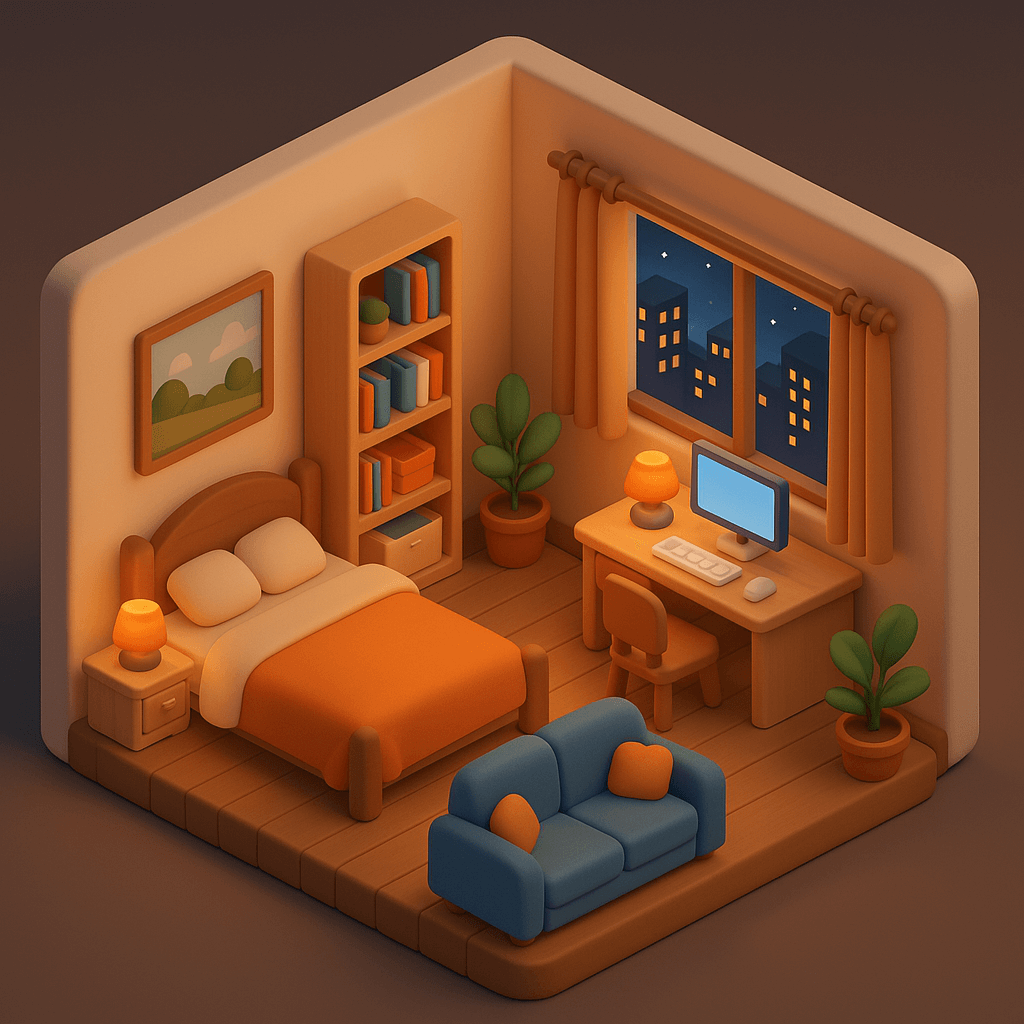
Stylized 3D Room Visualization — Real Estate AI Prompt
TL;DR: A cute C4D-style isometric room rendering — turn an empty space into a full furnished concept. Use this ChatGPT Image 2.0 prompt to visual staging concept for an empty listing. Replace the bracketed inputs with your details, paste into ChatGPT, and download the result.
Good for
- Visual staging concept for an empty listing
- Buyer-aspiration "imagine living here" carousel slide
- Listing portal alternative-style hero image
What you need
- A photo or floor plan of the room
- Furnishing direction (modern, scandi, industrial, kids, etc.)
- Optional: city view direction
The realtor-adapted prompt
Copy the prompt below, paste it into ChatGPT (with image generation enabled), and replace each [your X] placeholder with your real details.
Generate a [your style, e.g. cozy 3D] room design rendering based on [your empty room photo or floor plan]. Furnish with: a bed, bookshelf, sofa, green plants, a desk and chair. Add a framed artwork on the wall. Through the window, show a [your view, e.g. city nightscape with glowing buildings / soft sunrise]. Soft rounded stylised forms. Warm inviting lighting. C4D-quality render, isometric view, cute 3D aesthetic, 1:1 square, magazine-quality. Tiny watermark bottom-right: "[your project name] · [your phone]".
How to use this prompt — step by step
- Open ChatGPT (chat.openai.com) and start a new chat.
- Make sure image generation is enabled (use ChatGPT Plus, Pro or Team).
- Paste the realtor-adapted prompt above into the chat input.
- Replace every
[your X]placeholder with your real details. Don't leave any placeholder unfilled. - Press send and wait 10–30 seconds. Download the generated image.
- (Optional) Generate 2–3 variations and pick the strongest before publishing.
Original prompt
View the original (unmodified) source prompt
Design a cozy bedroom in a cute 3D style with C4D-quality rendering, presented in an isometric view. The room includes a bed, bookshelf, sofa, green plants, a computer desk, and a computer setup. A framed painting hangs on the wall. Outside the window, a nighttime cityscape is visible with glowing buildings and a dark sky. All furniture and objects should have a soft, rounded, stylized design to match the cute 3D aesthetic. Lighting should be warm and inviting, creating a comfortable nighttime indoor atmosphere.
Frequently asked questions
Is the Stylized 3D Room Visualization prompt free to use?
Yes. The library is free forever. The realtor adaptations are written by the PostAI Editorial Team and licensed for free commercial use. The original prompt is sourced under CC BY 4.0 (where applicable).
What inputs do I need for the Stylized 3D Room Visualization prompt?
Check the 'What You Need' section above. Typically you need a relevant photo (your own or the property's), a project / brand name, a one-line headline or tagline, and your contact details.
Can I customise the Stylized 3D Room Visualization prompt for my market?
Yes. Replace the bracketed placeholders with details specific to your market — district, price range, project name, language. The prompt structure works equally well for Singapore, Malaysia, Hong Kong, the United States, the United Kingdom and Australia.
Can I use this for new launches / off-plan units?
Yes. Use a developer rendering or floor plan as input. The prompts work just as well for renderings as for photos.
Does it work on dim or low-resolution phone photos?
Yes. The model performs lighting correction during generation. Provide as much resolution as possible (≥1080p) for best output sharpness.