Architecture Visualization — Real Estate AI Prompt
TL;DR: A photorealistic architectural rendering with sweeping perspective — perfect for a hero shot of a new-launch development. Use this ChatGPT Image 2.0 prompt to hero render for a new-launch poster. Replace the bracketed inputs with your details, paste into ChatGPT, and download the result.
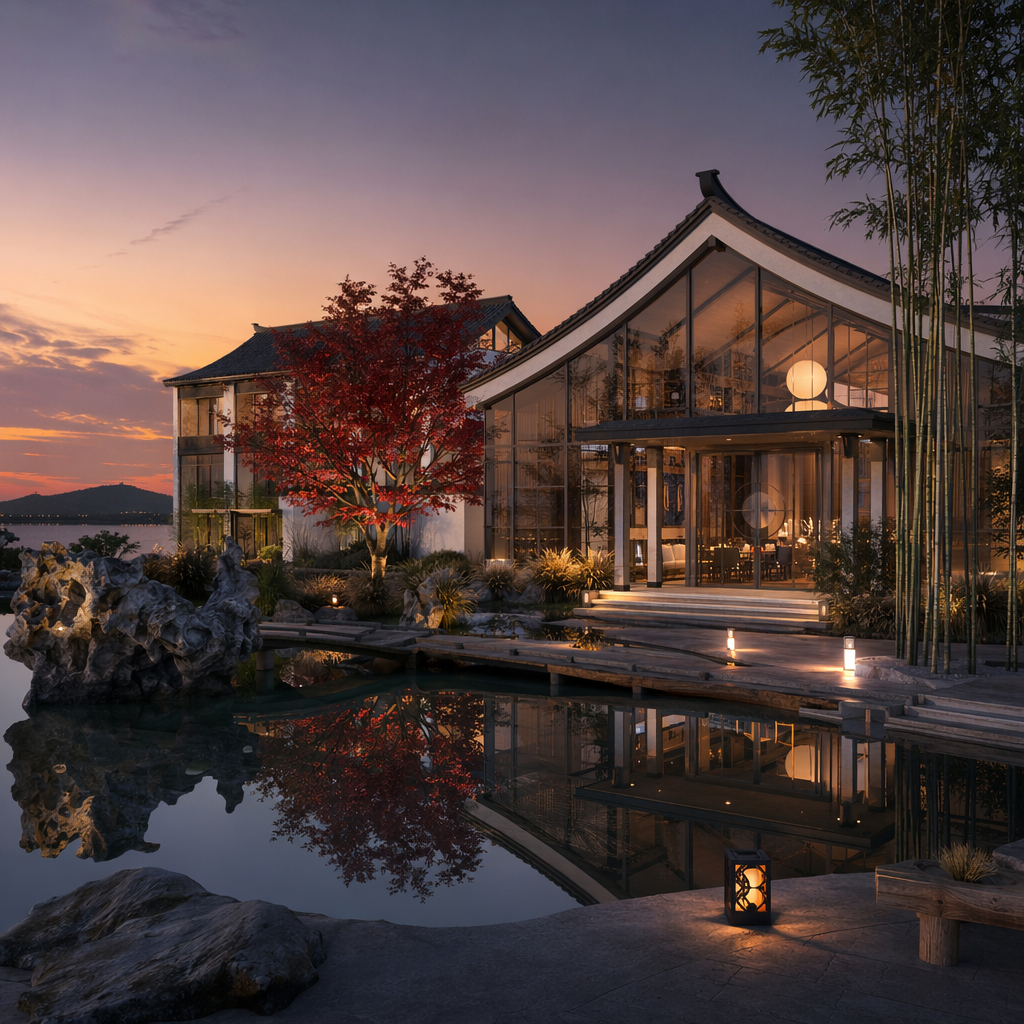
Good for
- Hero render for a new-launch poster
- Cover image for a development brochure
- Web-banner of a high-end project
What you need
- A reference photo or render of the building
- Project name + 1-line tagline
- Time-of-day preference
The realtor-adapted prompt
Copy the prompt below, paste it into ChatGPT (with image generation enabled), and replace each [your X] placeholder with your real details.
基于 [your property photo or render] 生成专业建筑可视化图。建筑主体保持原貌,但加强:宏伟视角(从街角仰拍),周围环境配套丰富(绿植、行人、远景城市),[your time of day, 例如 黄昏 6 点的金色光线]。前景增加水景或喷泉的反射。建筑材质:玻璃幕墙清晰反光,金属饰面有微妙质感,混凝土具有手工艺感。整体氛围:高端、精致、未来感。可以在右下角加上小字「[your project name] · [your phone]」。输出:4:5 竖版,建筑摄影品质,杂志渲染图标准。
How to use this prompt — step by step
- Open ChatGPT (chat.openai.com) and start a new chat.
- Make sure image generation is enabled (use ChatGPT Plus, Pro or Team).
- Paste the realtor-adapted prompt above into the chat input.
- Replace every
[your X]placeholder with your real details. Don't leave any placeholder unfilled. - Press send and wait 10–30 seconds. Download the generated image.
- (Optional) Generate 2–3 variations and pick the strongest before publishing.
Original prompt
View the original (unmodified) source prompt
建筑可视化渲染图。一栋位于杭州西湖边的现代中式精品酒店。白墙灰瓦坡屋顶与大面积落地玻璃幕墙结合,前方是一片静水池倒映建筑。园林中有太湖石、翠竹和红枫。黄昏时分,室内暖光透出,天空是渐变的橙紫色。摄影级建筑渲染,材质真实(混凝土、木材、石材质感),8K画质。
Frequently asked questions
Is the Architecture Visualization prompt free to use?
Yes. The library is free forever. The realtor adaptations are written by the PostAI Editorial Team and licensed for free commercial use. The original prompt is sourced under CC BY 4.0 (where applicable).
What inputs do I need for the Architecture Visualization prompt?
Check the 'What You Need' section above. Typically you need a relevant photo (your own or the property's), a project / brand name, a one-line headline or tagline, and your contact details.
Can I customise the Architecture Visualization prompt for my market?
Yes. Replace the bracketed placeholders with details specific to your market — district, price range, project name, language. The prompt structure works equally well for Singapore, Malaysia, Hong Kong, the United States, the United Kingdom and Australia.
Is this legal under MLS / portal listing rules?
AI virtual staging is allowed on most major portals (PropertyGuru, Zillow, 99.co, Rightmove, Domain) provided the listing is clearly marked "virtually staged" — your local rules may vary. The unit's actual structure must remain truthful.
Can I use this for new launches / off-plan units?
Yes. Use a developer rendering or floor plan as input. The prompts work just as well for renderings as for photos.