Luxury Real Estate Brochure — Real Estate AI Prompt
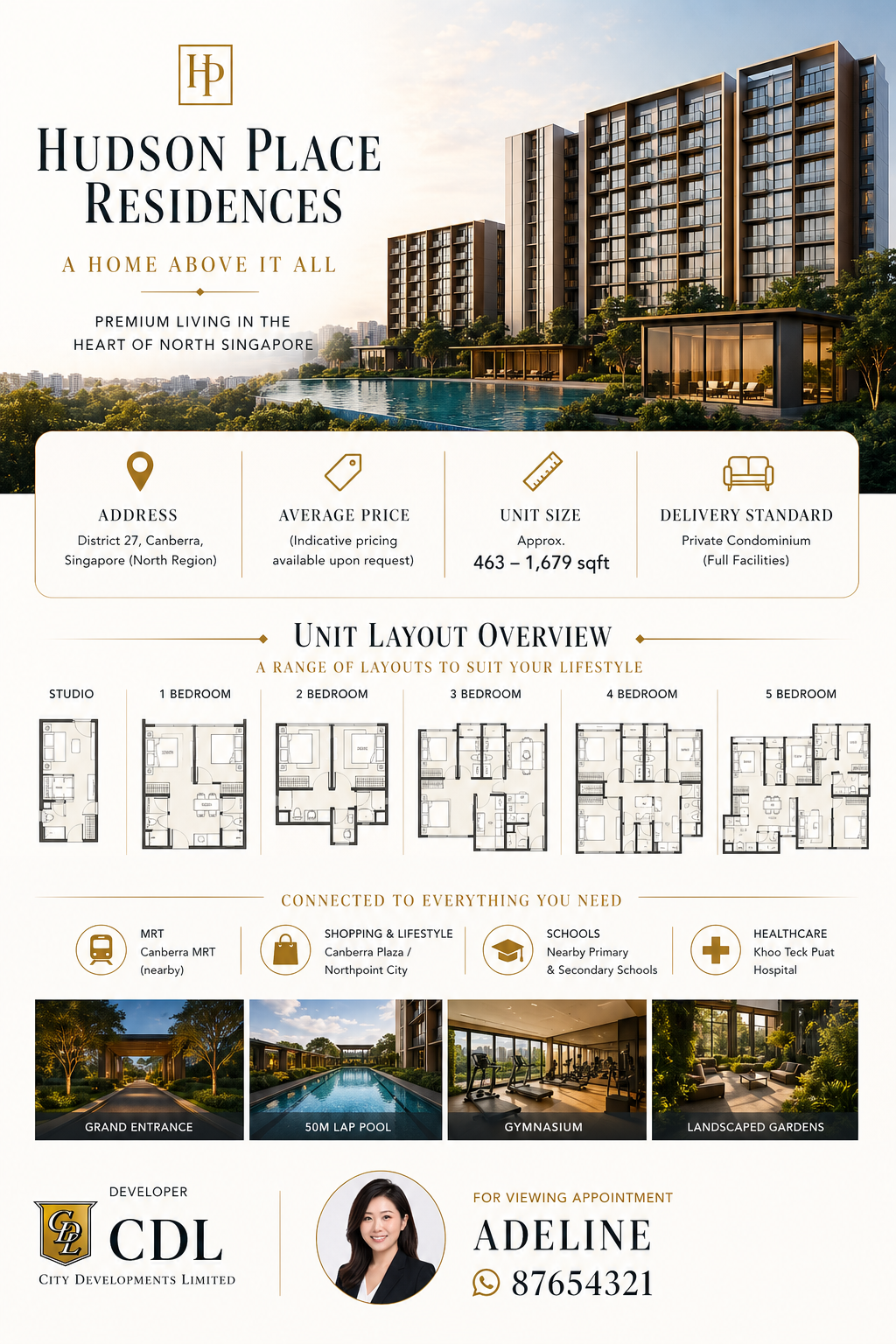
TL;DR: A single-page, developer-style brochure for a luxury condo launch — pearl-white background, gold accents, serif headers, hero render, key info bar, unit-layout thumbnails, amenity tags and an agent contact card with optional circular avatar. Use this ChatGPT Image 2.0 prompt to produce a print-ready 3:4 vertical brochure in one shot. Replace the bracketed inputs with your project details, paste into ChatGPT, and download the result.
Good for
- New-launch teaser flyer for IG carousels, WhatsApp broadcasts and email blasts
- VIP preview / private viewing single-pager (printable A4 or A3)
- Personal-brand listing presentation deck — drop one brochure per slide
- Showflat handout for walk-in buyers
What you need
- Project name + a one-line tagline (e.g. "A Home Above It All")
- Address / district + indicative price + unit size range + delivery standard
- Unit-type list (Studio / 1BR / 2BR / 3BR / 4BR / 5BR — pick what applies)
- Distances to nearest MRT, mall, school, hospital
- Developer name + agent name + WhatsApp / contact number
- Optional: Your agent avatar photo (square, plain background works best)
Note on the QR code: The bottom-right of the layout is intentionally left as clean space so you can paste your real WhatsApp / WeChat / profile QR code on top in Canva or Photoshop afterwards. AI image models cannot reliably generate scannable QR codes — the pixel pattern gets distorted. The QR-code area is optional — leave it blank if you don't need one and the layout still reads cleanly.
The realtor-adapted prompt
Copy the prompt below, paste it into ChatGPT (with image generation enabled), and replace each {TOKEN} placeholder with your real details. If you don't have an agent avatar, leave {AGENT_AVATAR} empty — the prompt's conditional logic will skip the avatar entirely instead of generating a placeholder.
Create a high-end real estate brochure (single-page layout) for a luxury apartment project.

Project Name: {PROJECT_NAME}

Style:
Luxury real estate brochure style, inspired by premium developers (e.g. Greentown, Vanke).
Use a clean layout with generous white space and refined typography.

Color & Design:
- Background: Pearl white
- Primary text: Deep charcoal / dark ink
- Accents: Subtle gold highlights
- Typography: Serif font for titles + Sans-serif for data

Layout Sections:

1. Hero Section:
- Main visual featuring {CORE_SELLING_POINT}
  (e.g. skyline view / greenery landscape / pool view / architectural facade)

2. Key Information Bar:
- Address: {ADDRESS}
- Average Price: {PRICE}
- Unit Size: {UNIT_SIZE_RANGE}
- Delivery Standard: {DELIVERY_STANDARD}

3. Unit Layout Overview:
- Display {UNIT_TYPES}
- Include simplified floor plan thumbnails

4. Nearby Amenities Tags:
- MRT: {METRO_DISTANCE}
- Commercial Area: {COMMERCIAL_DISTANCE}
- School: {SCHOOL_DISTANCE}
- Hospital: {HOSPITAL_DISTANCE}

5. Footer:
- Developer: {DEVELOPER_NAME}
- Contact / Viewing Appointment: {CONTACT_NAME} – {CONTACT_NUMBER}

6. Avatar (Conditional Logic):
- If {AGENT_AVATAR} is provided:
    • Place a circular avatar photo at the bottom section (aligned with contact info)
    • Style: clean, professional, subtle shadow, premium look
- If {AGENT_AVATAR} is NOT provided:
    • Do NOT generate or include any avatar image
    • Keep layout clean without placeholder

7. QR Code Space (Optional):
- Reserve a clean square area in the bottom-right corner for a QR code
- Do NOT generate or render a QR code (AI cannot produce a scannable one)
- Leave the space empty so the agent can paste a real QR code on top afterwards
- If a QR code is not needed, the empty square should still read as intentional negative space

Overall Feel:
Elegant, premium, minimalistic — similar to top-tier Singapore luxury property marketing brochures.

Aspect Ratio:
3:4 vertical layout
Sample inputs (used to produce the brochure above)
- PROJECT_NAME: Hudson Place Residences — "A Home Above It All"
- CORE_SELLING_POINT: Architectural facade with 50m lap pool and landscaped grounds at golden hour
- ADDRESS: District 27, Canberra, Singapore (North Region)
- PRICE: Indicative pricing available upon request
- UNIT_SIZE_RANGE: Approx. 463 – 1,679 sqft
- DELIVERY_STANDARD: Private Condominium (Full Facilities)
- UNIT_TYPES: Studio, 1BR, 2BR, 3BR, 4BR, 5BR
- METRO_DISTANCE: Canberra MRT (nearby)
- COMMERCIAL_DISTANCE: Canberra Plaza / Northpoint City
- SCHOOL_DISTANCE: Nearby Primary & Secondary Schools
- HOSPITAL_DISTANCE: Khoo Teck Puat Hospital
- DEVELOPER_NAME: CDL — City Developments Limited
- CONTACT_NAME: Adeline
- CONTACT_NUMBER: 87654321 (WhatsApp)
- AGENT_AVATAR: Provided (circular crop, professional headshot)
How to use this prompt — step by step
- Open ChatGPT (chat.openai.com) and start a new chat. Image generation requires Plus, Pro or Team.
- If you have an agent avatar, attach the photo to the chat first so ChatGPT can use it as the avatar reference.
- Paste the realtor-adapted prompt above into the chat input.
- Replace every
{TOKEN}placeholder with your real project details. Don't leave any placeholder unfilled. - Press send and wait 20–60 seconds. Download the generated brochure.
- (Optional) Open the image in Canva / Photoshop and paste your real QR code into the bottom-right space, then export for IG / WhatsApp / print.
- Generate 2–3 variations and pick the strongest before publishing.
Tips for a stronger output
- Be specific in CORE_SELLING_POINT. "Architectural facade with 50m lap pool at golden hour" beats "nice view" — the more concrete the visual brief, the more distinctive the hero render.
- Avatar photo prep. Crop your headshot to a square with a plain or softly blurred background before attaching. ChatGPT will composite a cleaner circular avatar.
- Floor-plan accuracy. The generated unit thumbnails are decorative — for client-facing collateral, swap them for the developer's real floor plans in post.
- Brand colour swap. If your agency uses a different accent colour (e.g. burgundy, navy), replace "Subtle gold highlights" with your brand colour. Keep the pearl-white background — it carries the "premium" signal.
Frequently asked questions
Is the Luxury Real Estate Brochure prompt free to use?
Yes. The library is free forever. The realtor adaptations are written by the PostAI Editorial Team and licensed for free commercial use.
Why does the prompt leave space for a QR code?
AI image models cannot reliably generate scannable QR codes — the pixel patterns get distorted. The prompt instead reserves a clean square area at the bottom-right so you can paste your real WhatsApp / WeChat / agent profile QR code in Canva or Photoshop afterwards. The QR-code area is optional — leave it blank if you don't need one.
What inputs do I need for the Luxury Real Estate Brochure prompt?
Project name, address, indicative price, unit size range, delivery standard, unit-type list, distances to MRT / commercial / school / hospital, developer name, agent name + contact number, and optionally an agent avatar photo. The avatar is conditional — if you don't provide one, the layout adjusts so no placeholder is generated.
Can I use this for HDB or resale listings?
It's tuned for new-launch private condos, but you can repurpose it for resale by replacing the developer field with the project's original developer (or the agency name) and swapping unit-layout thumbnails for the actual floor plan. The pearl-white + gold treatment may feel over-styled for HDB resale — for that, consider the Blueprint Monument or 4-Panel Banner prompts.
How do I make the unit-layout thumbnails look realistic?
Generated floor plans are decorative, not architecturally accurate. Treat them as visual placeholders. For client-facing brochures, swap them out for the developer's real floor-plan PDFs after generation.