Virtual Staging for a Tenanted Unit You Cannot Rearrange
A tenanted unit comes with someone else's furniture, laundry and daily routine, and you cannot ask the tenant to redecorate. You often get one short slot to take photos. This page explains how to get usable images from that visit and turn them into clean, staged photos.
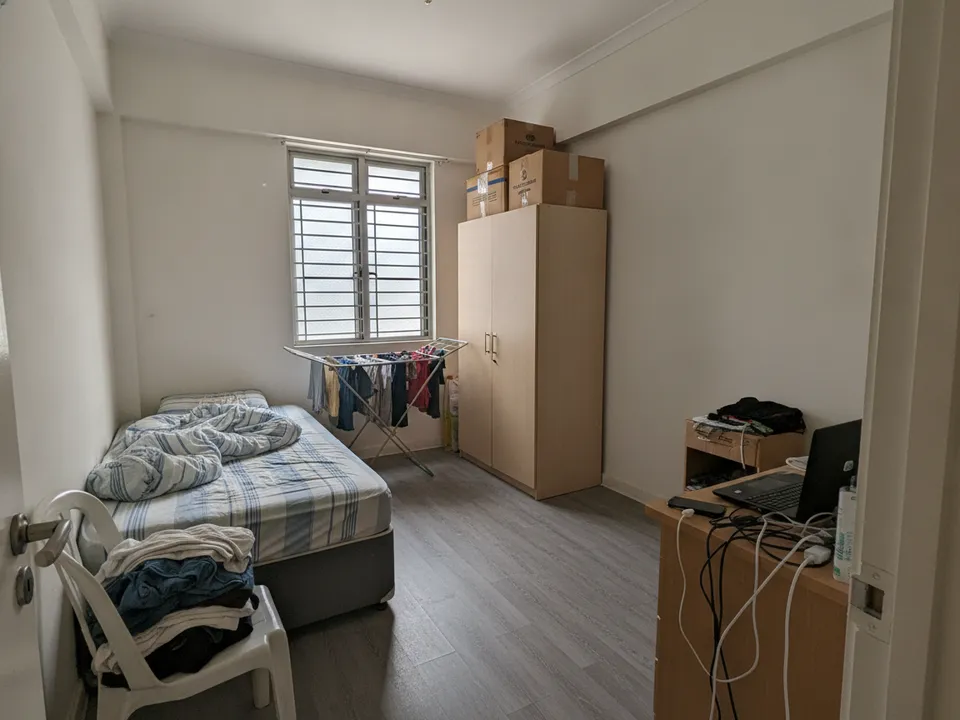
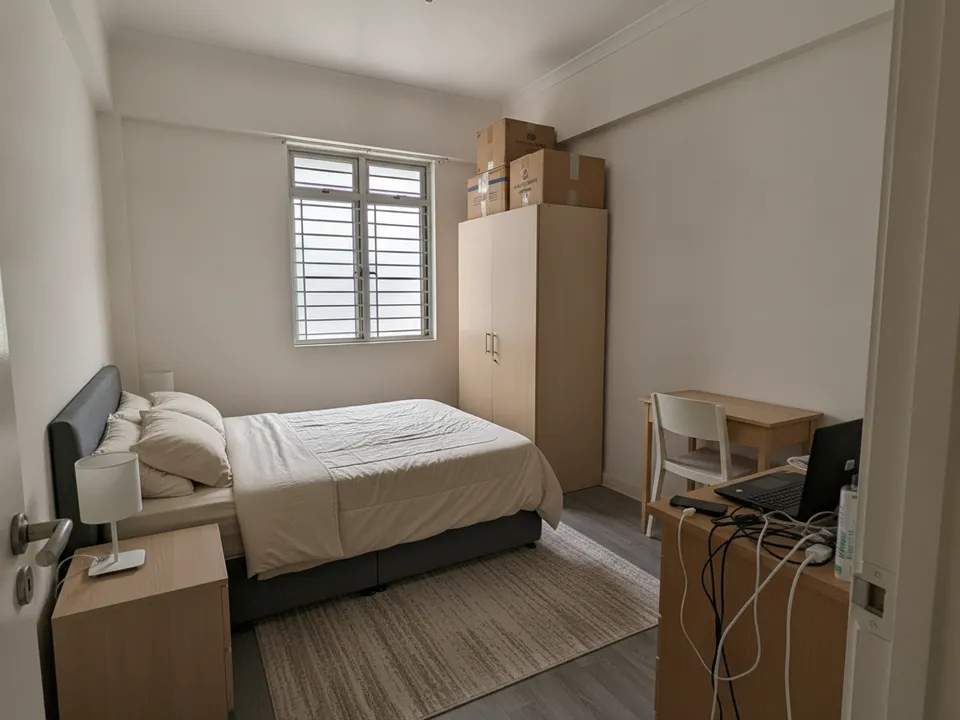
A tenanted HDB bedroom with the tenant's belongings, decluttered and restaged Drag to compare. AI-generated example for illustration, not a real listing.
The problem with tenanted listings
Tenants are not obliged to tidy for your shoot, and many will not. Photos end up showing personal items, mismatched furniture and drying racks, which distract buyers and can expose the tenant's private life online. Repeat viewings are also hard to arrange, so the photos have to carry more of the selling.
At the same time, a tenanted property often appeals to investors, who still want to see the space clearly and judge how it would rent.
Getting the photos right on the day
Agree the shoot time with the tenant through the landlord, explain which rooms you need, and ask permission before photographing bedrooms. Be quick and respectful.
- Shoot each room once from the doorway, phone at chest height, lights on and curtains open
- Avoid photographing family photos, documents, screens or anything with names
- Do not move the tenant's belongings without asking
- Take one extra wide shot of the kitchen and bathrooms as they are
Declutter first, then stage
For occupied rooms, the useful step is auto decluttering: removing the tenant's loose items and furniture from the photo so you are left with the empty room, then staging it with neutral furniture. PostAI's AI Image Studio does both, at one credit per photo, and new accounts start with 6 free credits.
Keep everything that belongs to the unit, such as built-in wardrobes, kitchen cabinets and aircon units. Removing those would misrepresent what the buyer gets.
Disclosure and the tenancy
State in the listing that the unit is tenanted and when the lease ends, and label every edited image as virtually staged. Show at least one real photo of each staged room. PropertyGuru expects interior photos to show the actual condition, so check portal rules before using staged images as the listing photos; use them freely in labelled social posts and videos.
If the buyer is an investor, a tenanted unit with a stable lease can be a selling point. Say so plainly rather than hiding it behind staged images.
Stage your own listing photos free
New PostAI accounts get 6 free credits: that is 6 staged photos, no credit card.
Stage 6 photos free See real resultsQuestions agents ask
Do I need the tenant's permission to take photos?
Arrange the shoot through the landlord and get the tenant's agreement on timing and rooms. Avoid capturing personal items or anything identifying.
Can I remove built-in furniture in the photo?
No. Built-ins are part of what the buyer gets, so keep them; remove only the tenant's loose belongings.
Should I mention the tenancy in the listing?
Yes. State that the unit is tenanted and when the lease ends, so buyers and investors can plan.
Is decluttering one credit or two?
Each output photo uses one credit in PostAI, so check the result after decluttering and staging before you buy more.
Related
virtual-staging/tenanted-unit · v1 · Book a free Zoom walkthrough